Dashboard
Dashboard Docs
PalmKash ships four sign-in surfaces — one for each kind of user. This is where you manage merchants, wallets, transactions, terminals and the API tokens that power the Merchant API.
Overview
Each role has its own panel at its own path. Pick the one that matches who is signing in:
| Panel | Path | Who it's for |
|---|---|---|
| Merchant | /merchant | Businesses accepting payments & making withdrawals. |
| Agent | /agent | Field agents onboarding clients and running terminals. |
| Client | /user | End customers viewing wallets & transaction history. |
Signing in
Go to the panel path for your role and sign in with the credentials issued to you. The merchant, agent panels also support password reset from their login screens.
/merchant for a merchant account.API keys
The Merchant API authenticates with two values that both come from your merchant account:
| Credential | Used as | Purpose |
|---|---|---|
| Merchant key | merchant_id & X-Merchant-Key & HMAC secret | Identifies your account and signs every request. |
| API token | Authorization: Bearer | Authorises calls to the payments endpoints. |
Merchant panel
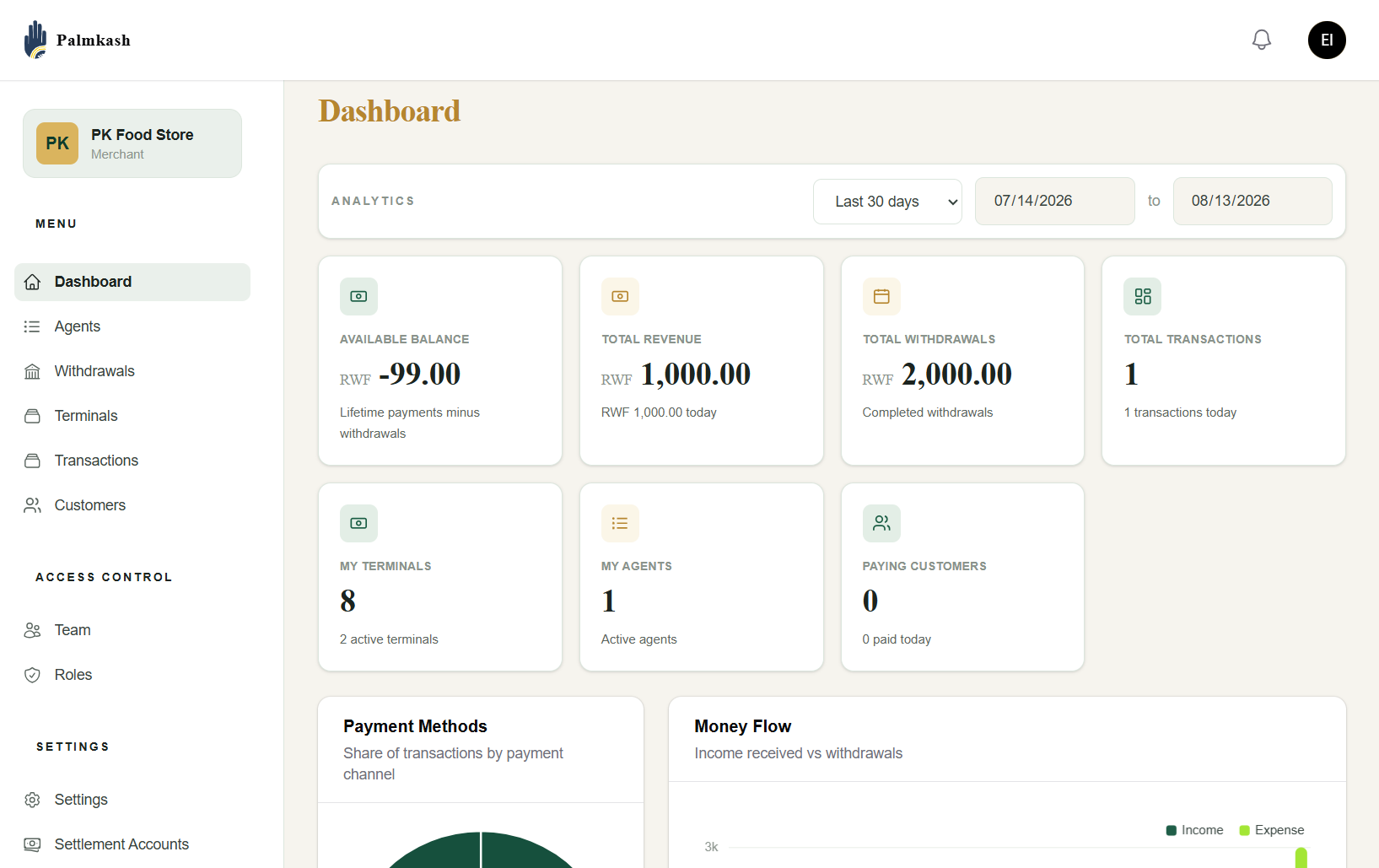
The merchant dashboard is where a business lives day to day — a snapshot of money in and out, plus everything needed to run collections and payouts. It's also where your API credentials for the Merchant API are managed.
Navigation
The left sidebar is grouped into three sections:
| Group | Items |
|---|---|
| Menu | Dashboard · Agents · Withdrawals · Terminals · Transactions · Customers |
| Access Control | Team · Roles |
| Settings | Settings · Settlement Accounts |
Analytics & date range
The dashboard scopes every figure to a date range. Pick a preset such as Last 30 days, or set a custom from → to range. All the cards and charts below update to match.
Key figures
The top rows summarise the account at a glance:
| Card | What it shows |
|---|---|
| Available balance | Lifetime completed payments minus withdrawals — the funds you can pay out. Can be negative if withdrawals exceed settled income. |
| Total revenue | Payments received in the range, with today's figure called out. |
| Total withdrawals | Completed withdrawals in the range. |
| Total transactions | Count of transactions, with today's count called out. |
| My terminals | Terminals registered to you, and how many are active. |
| My agents | Agents linked to your account, and how many are active. |
| Paying customers | Distinct customers who have paid you, with today's count. |
Charts
- Payment Methods — a donut showing the share of transactions by payment channel (e.g. MTN MoMo vs Airtel Money).
- Money Flow — income received versus withdrawals (expense) across the range.
Client dashboard
End customers get a lightweight dashboard at /user to see their wallets and a history of their transactions. It is intentionally simpler than the operator panels.
Building an integration? Start with the API docs, then the API Reference.